Best AI Presentation Makers: 7 Tools Compared
Compare seven AI presentation makers, inspect a real Brainbaby PDF and PowerPoint export, and check pricing, editing and handoff before choosing a plan.
The best AI presentation maker for your task should turn source notes into a clear deck, let you revise the slides and deliver the file your audience needs. A polished first draft is useful, but the buying decision also depends on editing, collaboration, export and the number of corrections you must make.
Publisher disclosure: Brainbaby publishes this guide and lists its own product first for people who want to develop source notes and slides in one AI workspace. This is our editorial choice, not an independent award. Official pricing references were checked on October 29, 2026. The Brainbaby example below is an actual exported deck; we have not run a comparative speed or quality benchmark across the seven tools. Plan access and export options can change.
Download the free presentation-tool comparison worksheet (.md) and blank scorecard (.csv). They include a fictional six-slide test, export checks and an empty results table. No account is required, and downloading them does not generate a deck or use credits. You can adapt and share these original planning resources under CC BY 4.0 with attribution.
Choose by the work you need to finish
| Your starting point | Workflow to investigate | What to check in your own trial |
|---|---|---|
| Source notes that need a clearer argument | Brainbaby | Whether you can refine the outline, correct facts and finish your chosen output |
| A document or outline you want to turn into a shareable deck | Gamma | Import quality, editing and the destination export |
| A deck that needs manual visual control and team input | Canva | Template fit, collaboration and the features included in your plan |
| A business deck where consistent layout is the main bottleneck | Beautiful.ai | Smart Slide behavior, brand control and export editability |
| A team that needs to keep editing inside PowerPoint | Plus AI | Native slide objects, add-in access and existing template fit |
| Notes you want to turn into slides in an existing editor | SlidesAI | Text import, slide length and the supported editor workflow |
| A shared workspace for creating and revising a team deck | Pitch | Template fit, collaboration and PowerPoint export access |
These are starting points for a trial, not universal rankings. Use the same content in two shortlisted tools so the comparison reflects your actual job.
1. Brainbaby: start with the argument and supporting material
Use Brainbaby when your deck begins as a business question, research notes or a rough outline. Start with an audience and a decision: “Help our leadership team choose whether to expand this pilot.” Ask for the slide structure before requesting a presentation. That makes gaps visible while they are still easy to fix.
The free presentation templates provide complete outlines and editable briefs without a signup. Choose a quarterly review, sales proposal or product roadmap, add your own evidence, then continue in the presentation maker. Check the current plan allowances before purchasing. Free outlines do not imply unlimited generation.
Inspect an actual Brainbaby deck before signing up
This four-slide community-garden example was generated in Brainbaby on October 2, 2026, with one body-text edit saved that day. We reopened it and exported the files on October 17. Browse all four slides, download the actual PDF or download editable PowerPoint without an account.
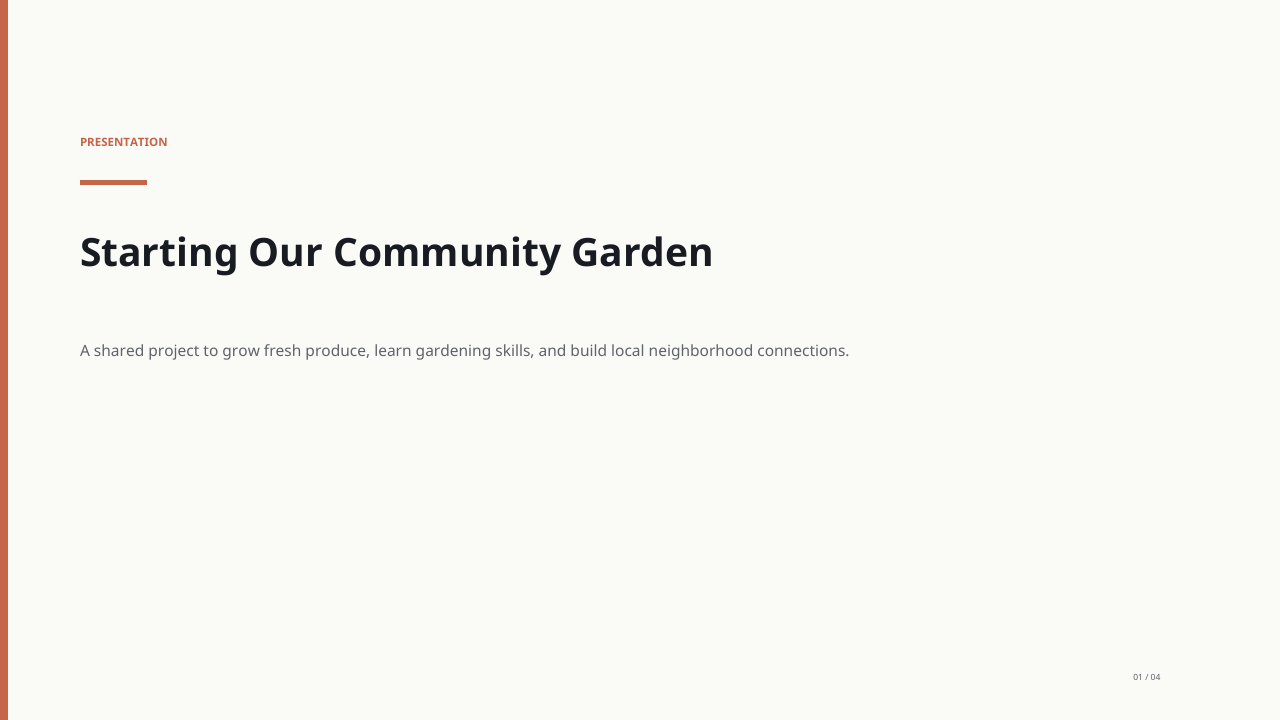
The preview shows the PDF export; PowerPoint layout can differ. The garden and schedule are fictional, and proposed Friday or Saturday activities are not confirmed events. This example demonstrates one generated deck and its exports, not a guarantee that every presentation will be accurate or need the same amount of editing.
For an offline review, download the 13-file presentation evaluation kit. It bundles these unchanged exports, four PDF previews, the original request, a separate comparison worksheet and a blank CSV scorecard. Inspect the files and review notes on GitHub. The worksheet and scorecard are CC BY 4.0 planning resources; the generated example and previews are outside that license. The retail worksheet exercise is separate from the garden example, and no tool scores are prefilled.
For a presentation you need at work, prepare a sales-proposal brief or use the six-slide planner. Preparing a brief is free and does not start generation. Brainbaby Go is $4/month and Pro is $20/month at the standard global USD reference prices. Presentation generation uses your account's shared AI allowance; sign in to check your remaining usage before creating a deck. Compare plans for presentation work and review the actual recurring charge and terms at checkout. Regional prices, currencies and eligible offers can differ.
2. Gamma: investigate document-to-deck and live sharing
Gamma's presentation documentation describes creating from a prompt, pasted outline or uploaded document, then refining the result. Its published workflow includes presenting in Gamma, sharing a live link and exporting to PowerPoint, PDF or Google Slides.
For your trial, inspect how the imported document is divided into sections and open the exact export your recipient needs. A readable browser view does not establish that every font, chart or layout remains editable in another application. Verify the available options in your selected plan.
3. Canva: investigate visual editing and collaboration
Canva's AI presentation page describes AI-assisted drafting alongside a visual editor, templates and collaboration. Its workflow also includes presentation exports, while access to particular brand features depends on the plan.
Try this path if choosing imagery, adjusting individual elements and working with a teammate are central to the job. Check the rights and plan requirements of the assets you actually use. Our Brainbaby and Canva workflow comparison explains how to review both with one brief.
4. Beautiful.ai: investigate automatic layout consistency
Beautiful.ai's presentation software page describes AI drafting and Smart Slides that adjust layout as content changes. It also documents brand controls, collaboration and PowerPoint or PDF exports.
Test a realistic revision: add two more rows to a table, replace a short heading with a longer one and update a chart. Check whether the layout remains readable and whether the exported file supports the edits your team needs. Automatic formatting is valuable when it survives the changes you actually make.
5. Plus AI: create and revise in PowerPoint or Google Slides
Plus AI's PowerPoint documentation describes an add-in that creates native slides from a prompt or an uploaded document. Its editing tools can rewrite text and reformat existing slides within PowerPoint.
Shortlist it when handing an editable PowerPoint file to a colleague is a firm requirement. Try it with your actual template and one chart that needs an update. Verify that the recipient can edit the relevant objects, and check which custom-template features your plan includes.
6. SlidesAI: turn prepared text into an editable deck
SlidesAI's text-generation guide covers creating a presentation from prepared text and refining the result. The service documents workflows with Google Slides and PowerPoint.
Test it with notes that already have a clear structure. Inspect how much text lands on each slide and whether headings retain the original meaning. Confirm the workflow available in the editor you use rather than assuming that every feature works identically across editors.
7. Pitch: develop a deck in a shared workspace
Pitch Agent's documentation describes working from a prompt, source files and a chosen template. Pitch also documents PowerPoint export.
Investigate it when the team needs to keep refining the same deck. Check the review workflow, brand template and export access in your selected plan. Open the exported file in the recipient's editor and inspect a long heading, a chart and speaker notes before treating the handoff as finished.
Pricing and free access at a glance
These are plan references checked on October 29, 2026, not equivalent bundles. Annual prices require an annual commitment. Confirm currency, tax, billing period, usage and export access in the linked checkout. An advertised free trial may require a card and renew automatically.
| Tool | Public starting point | Paid reference and buying check |
|---|---|---|
| Brainbaby | Free outlines, planner and the exported example above; an account has its own available AI allowance | Go $4/month or Pro $20/month, global USD references. Presentation generation uses shared AI allowance; check your account and actual checkout terms |
| Gamma | Free plan lists up to 10 slides per prompt and PDF/PPTX export | Plus removes Gamma branding; confirm the current price and credit limits |
| Canva | AI-assisted drafting with its visual editor | Check Canva's current access, asset rights and brand features for your account |
| Beautiful.ai | 14-day trial; review card and renewal requirements | Pro $14.50/month billed annually; an ad hoc monthly option is $45 |
| Plus AI | 7-day trial; card required and automatic billing applies | Basic $15/user/month or $10 billed annually; document uploads require Pro |
| SlidesAI | Basic lists 200 AI credits/month and 2,500 input characters per presentation | Pro $10/month billed at $120/year; check input and AI-credit limits |
| Pitch | Free includes 100 non-renewing AI credits | Plus lists €10/month paying yearly, with PowerPoint export; confirm your seat and regional quote |
These references help narrow a shortlist. They do not establish which tool will finish your job most cheaply. Include the corrections, collaboration, assets and exports you actually need in the comparison.
Compare free access, credits and export restrictions
“Free” can mean an outline, a limited generation allowance or a time-limited trial. It does not always include editable exports, branded templates or unlimited revisions. Before choosing a subscription, check four items in the current checkout: generation allowance, credit cost of revisions, required export format and any watermark.
Brainbaby's presentation templates are free to read and download without an account. AI generation and paid features have separate plan allowances. To evaluate your workflow, choose an outline first and then open the presentation maker with your own source notes.
Use this same-brief comparison
The following is a fictional test scenario, not a Brainbaby customer result. A small retailer is deciding whether to continue a delivery pilot. The supplied notes say:
- The pilot ran for four weeks at two stores.
- Delivery orders increased from 80 to 110 per week.
- Fulfillment cost rose from $4 to $6 per order.
- Customer feedback is positive, but the sample is small.
- Management must decide whether to continue, change the service area or stop.
Give each shortlisted tool this brief:
Create a six-slide decision deck for a retail leadership team using only these notes. Cover the decision, pilot scope, order volume, fulfillment cost, uncertainty and recommended next experiment. Do not invent revenue, profit, customer quotes or statistical significance. Identify missing information in speaker notes. Use one main point per slide and keep the final decision explicit.
A useful draft should distinguish higher order volume from proven profitability. It should also preserve the four-week period, two-store scope and limited feedback. If it invents sales revenue or claims the pilot succeeded conclusively, correct that before evaluating the design.
What a correct slide should and should not say
| Detail in the fictional notes | Acceptable slide claim | Claim to reject |
|---|---|---|
| Weekly orders: 80 to 110 | Orders increased by 30 per week, or 37.5% relative to 80 | Revenue increased by 37.5% |
| Fulfillment cost: $4 to $6 per order | Cost per order increased by $2, or 50% relative to $4 | Profit rose because orders increased |
| Four weeks at two stores | The result describes this small pilot | Every store will achieve the same result |
| Positive feedback with a small sample | Feedback is encouraging but limited | Customers conclusively prefer the service |
| No revenue or margin figures | Profitability remains unknown | The pilot is profitable |
The percentages are arithmetic on this fictional input, not a product performance result. A chart must label its unit, period and starting value. Use a zero baseline for a simple order-count bar chart; placing orders and dollars on one unlabeled axis would confuse two different measures.
Revise one thing in each tool: change the final recommendation from expanding to continuing a limited pilot while collecting revenue and margin data. Then open the exported file and check that the new recommendation, numbers and speaker notes survived. This evaluates a complete workflow rather than an attractive first screenshot.
Score the finished workflow
Use a simple 0–2 score for each criterion: 0 means it fails the requirement, 1 means you can fix it with meaningful work, and 2 means it meets the requirement after normal review.
- Evidence: Does the deck preserve every supplied number and label unknowns?
- Story: Does each slide lead toward the management decision?
- Editing: Can you change the recommendation without rebuilding everything?
- Readability: Are headings, charts and contrast clear on a phone and a projector?
- Handoff: Does the required export open correctly and support the recipient's edits?
- Cost: Do the paid features and generation limits fit your expected use?
Leave the CSV score cells empty until you have tested the tool. Enter 0, 1 or 2 only for checks you actually completed; record an unavailable feature separately. This is a manual worksheet, with no automatic scores, formula totals or preselected winner. Record the plan, date, currency, actual revisions and time to a usable handoff. Do not measure only the first generated response. A faster draft can still take longer to finish.
Treat essential requirements as gates before comparing scores. If you need an editable PowerPoint file and cannot access one in the plan you tested, a high design score does not solve that requirement. Likewise, stop before uploading confidential sources if your organization has not approved the tool.
When you have your own notes ready, use the free six-slide presentation planner to prepare and review an editable brief. The planner itself does not generate slides. Continuing takes the brief into Brainbaby's workspace, where you confirm generation and check the allowance shown in your account.
Common questions
Which AI presentation maker is best for business?
Choose around the bottleneck in your work. Evaluate structure when your notes are unclear, layout when formatting is slow, and collaboration when several people review the deck. The fictional retail brief above provides a consistent starting test.
Which AI presentation maker is best for students?
Start with the assignment requirements: permitted AI use, citations, presentation length and the file your teacher accepts. Test whether the tool keeps source references visible and lets you correct a slide yourself. Use the free six-slide planner to organize the question, evidence and limitations before evaluating paid generation. Never treat generated citations as verified references.
What should I check in an AI PPT maker?
Open the actual PPTX in the recipient's editor. Change a heading, edit a chart value and check speaker notes, line wrapping and fonts. A file that opens is not necessarily fully editable. Confirm the export is included in the plan you are considering before subscribing.
Can I make a presentation from text for free?
You can use Brainbaby's free outlines without signing up. Generation, editing, asset and export access depend on the product and plan. Our text-to-presentation guide shows how to turn source notes into a slide outline before choosing a paid workflow.
Should I replace PowerPoint or Google Slides?
Only if the new workflow supports the handoff you need. Keep your existing editor when collaborators depend on its comments, chart editing or company template. Test an exported deck in that editor before committing to a subscription.
How do I keep an AI-generated deck accurate?
Provide source notes, separate facts from assumptions and review each claim against the original material. Open the final file and inspect its charts, text and speaker notes before sending it. AI drafting reduces blank-page work; the presenter still owns the final argument.
Inspect a real deck. Then plan your own.
Browse the four-slide Brainbaby example and open its PDF or editable PowerPoint before choosing a tool. When you are ready, prepare a brief for your next work presentation.
Generated in Brainbaby on October 2, 2026, with one body-text edit saved that day. Reopened and exported on October 17, 2026. These previews show the PDF export; PowerPoint layout can differ. This is a fictional community-garden example. The Friday and Saturday references are proposed wording, not confirmed events. Replace the schedule and review the content before using it.
The example and planner are free. Generating your own deck requires an account and uses your available shared AI allowance. Go is $4 USD/month and Pro is $20 USD/month at global reference prices. Regional prices, currencies and eligible offers can differ.
Compare presentation plans