6 Best No-Code App Builders in 2026
Compare six options for prompt-led projects, portals, visual workflows and mobile apps. Inspect a working Brainbaby export and plan the credits for your first version and changes.
The best no-code app builder should make your app easier to change after the first version, not just easier to start. A client portal, a native mobile app and a custom web dashboard need different tools. Before comparing prices, decide who will use the app, what data it needs and which action must work reliably.
This guide shortlists six builders for different approaches to app creation: prompt-led generation, portal building, visual workflows, integrated data logic, frontend design and mobile development. You will find a comparison table, pros and limitations, a practical selection exercise and a reusable starter brief.
Publisher disclosure: Brainbaby publishes this list. We put Brainbaby first as our editorial choice for prompt-led projects within an AI workspace. The other positions organize useful alternatives by workflow; they are not universal quality scores. We checked official product information on October 12, 2026. The Brainbaby export example below was verified on October 17, 2026; we do not claim hands-on testing of every platform.
Our six no-code app builder picks
- Brainbaby: our pick for turning a brief into a web or mobile prototype alongside AI chat and creative tools.
- Softr: for client portals and operational apps built around data and permissions.
- Bubble: for visually configured custom application workflows.
- Momen: for a visual app builder with integrated data, API and action-flow capabilities.
- WeWeb: for visual web interfaces, external data connections and export options.
- FlutterFlow: for mobile-first visual development with Flutter code output.
What counts as a no-code app builder?
A no-code app builder lets you create the initial app without manually writing its code. A classic visual builder gives you controls for pages, data and logic. An AI builder can generate a project from natural language, then let you revise it through prompts, visual tools or source code.
These approaches overlap, but the maintenance work differs. A generated codebase needs someone to understand its dependencies and failures. A visual platform needs someone to understand its workflow rules and plan limits. In either case, define the app's behavior and verify it with real actions.
For more prompt-focused options, including Zite, Emergent and Base44, see our separate no-code AI app builder comparison.
The best no-code app builders compared
| Pick | Builder | Best for | Standout approach | Pricing reference |
|---|---|---|---|---|
| 1 | Brainbaby | Prompt-led prototypes and surrounding AI work | Web and mobile projects alongside chat, assets and slides | Pro $20/month with builder credits; check action cost |
| 2 | Softr | Portals and internal operations | Data-connected apps with visual permission controls | Basic $19/month billed annually |
| 3 | Bubble | Custom application logic | Visual workflows and API connections | Web & Mobile Starter $59/month billed annually |
| 4 | Momen | Integrated visual app development | Data, APIs and action flows within one platform | Basic $33/project/month billed annually |
| 5 | WeWeb | Custom web interfaces | Visual frontend with integrations and source export | Essential $20/month; check hosting and backend costs |
| 6 | FlutterFlow | Flutter mobile apps | Visual development with downloadable code | Basic $39/month |
The plans are not interchangeable. A monthly figure billed annually means an annual commitment. Hosting, users, workload, credits, backend services and store accounts can add costs. The linked official plan pages below are the place to confirm the offer you will buy.
1. Brainbaby — best for a prompt-led app in an AI workspace
Brainbaby is our first pick for a project that starts with a written idea and also needs research, copy, assets and a presentation. Describe a small app, inspect the project, then request a targeted change. The mobile workflow creates a React Native and Expo starting point; the web workflow is available separately.
Pros
- Work on the app brief and generated project in a broader AI workspace.
- Use separate web and mobile workflows instead of treating every project as the same output.
- Prepare images, documents and slides for the product around the prototype.
Limitations
- Brainbaby is a prompt-led code-generation workflow, not a traditional visual database-and-workflow editor.
- A preview does not verify a connected backend, secure access, purchases or a store release.
- Generation and iteration use the applicable builder allowance.
Pricing: Brainbaby Pro lists $20/month with 15 app builder credits per month. An app can take multiple actions and revisions; a credit count is not a count of finished apps.
Choose it for: A small product prototype you want to plan, explain and iterate in the same workspace. Start with the web app brief or mobile app workflow.
Inspect a working result and its source
You can try this Brainbaby-built garden checklist before opening an account. Complete the six tasks, reset them and download the unchanged original source. On October 17, 2026, we reopened this owned QA project, checked its controls, exported it and built the downloaded project separately.
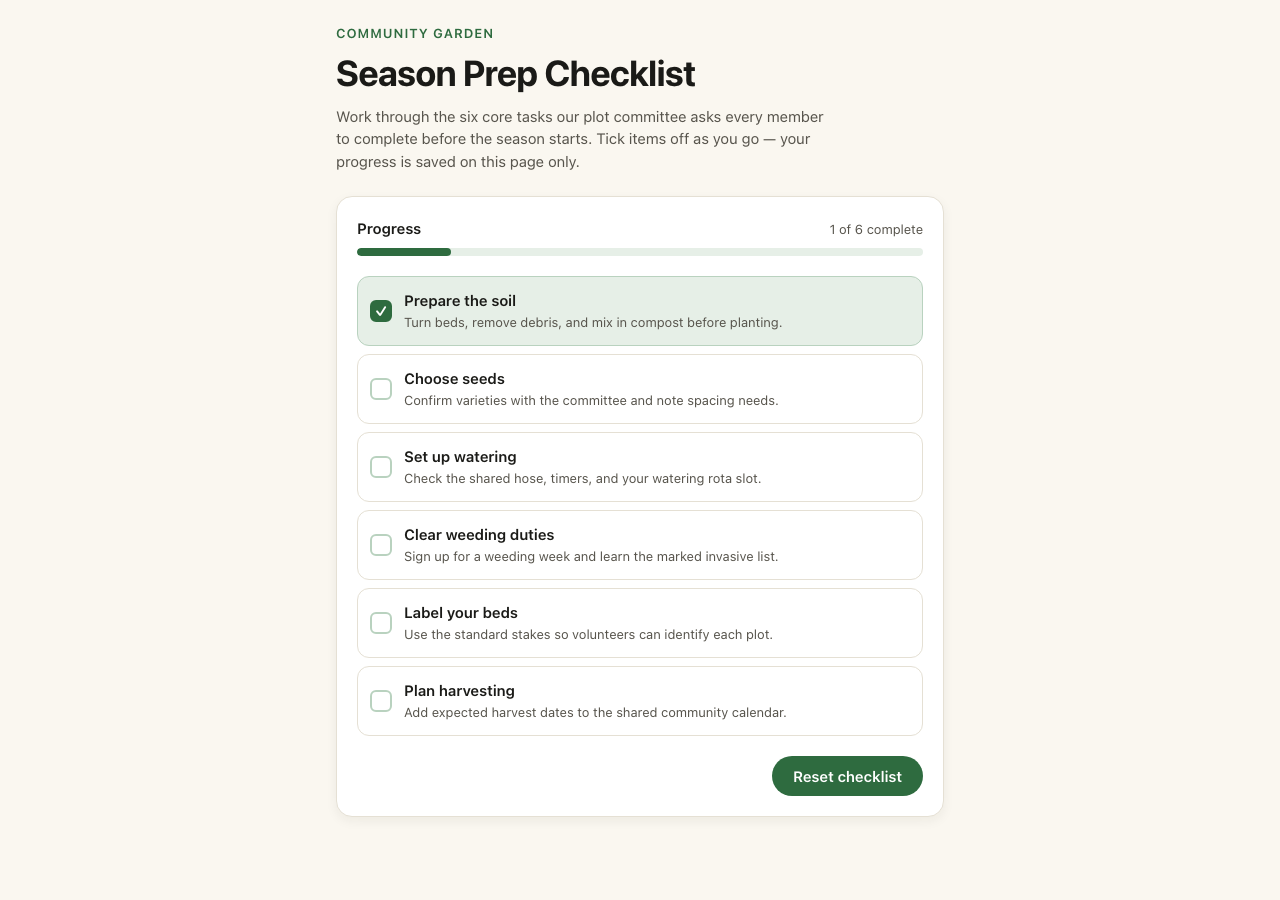
It is a small frontend example with local state; reloading clears its progress. It does not connect a backend or external service. Inspect the working interaction and source, then define the storage, permissions and release checks your own project needs.
Budget for changes as well as the first version. Pro's standard global monthly price is $20 with 15 builder credits. The current schedule assigns 10 credits to a new project, 3 to a scoped edit, 5 to a larger change and 2 to an automatic fix when offered. For example, a new project and one larger change use 15 credits; that does not guarantee a finished app. Compare plans with builder credits, and check the actual action quote before running it. The checkout shows regional prices, currency and any eligible offer.
2. Softr — best for portals and internal business apps
Softr is a useful starting point when users need access to a defined set of business records. Its official site describes an AI Co-Builder, visual editing, databases, workflows and external data connections.
Pros: The platform focuses on portals and operational apps. Visual permission controls help express which people should see which records and actions.
Limitations: Your data source, app-user count and permission requirements affect the plan. Confirm them before moving an existing operation into the app.
Pricing: Basic is listed at $19/month on annual billing in Softr's official overview. Review the current pricing page before buying.
Choose it for: A client portal. Write down what a client may read, edit and download, then evaluate that exact permission model.
3. Bubble — best for custom visual workflows
Bubble suits a project where application logic is central to the choice. Its visual platform includes workflows and API connections, with current offerings for web and mobile projects.
Pros: You can inspect a workflow as a sequence of actions rather than relying entirely on generated source. That approach suits apps with several conditional steps.
Limitations: Workload usage and project-level billing affect the cost. Choose the exact web or combined bundle that fits your release plan.
Pricing: The official pricing page lists Web & Mobile Starter at $59/month billed annually. This reference is for that combined plan, not every Bubble project.
Choose it for: A booking workflow with several statuses. Test a successful request, a rejected request and a repeated submission before adding more screens.
4. Momen — best for an integrated visual app workflow
Momen brings visual development together with database, API, action-flow and AI-agent capabilities. Its free offering supports previewing a small project, while paid plans expand the available limits and publishing options.
Pros: Keeping data and action flows in one platform gives you a clear place to trace an app's core behavior.
Limitations: Check the publishing tier, resource allowances and the AI provider costs for your project. A preview-only plan does not mean a public production app is included.
Pricing: Basic is $33 per project per month billed annually on Momen's pricing page.
Choose it for: An app with a data form and a defined action flow. Start with one record type and verify how the form handles invalid or duplicate input.
5. WeWeb — best for visually building a custom web frontend
WeWeb provides visual web-interface building, integrations and export options. It is worth considering when the interface needs to connect to an existing backend or when source export is part of the handoff.
Pros: Visual frontend controls and export choices help a team separate interface work from backend decisions.
Limitations: Budget the frontend plan, hosting and backend services separately where required. Decide who will maintain the app after export or self-hosting.
Pricing: The current WeWeb pricing page lists Essential at $20/month. Hosting and backend choices can add costs.
Choose it for: A custom dashboard over a test API. Verify loading, empty and error states as carefully as the normal populated screen.
6. FlutterFlow — best for a visual Flutter mobile workflow
FlutterFlow is a visual development choice for Flutter apps. Its paid Basic offering includes code and APK downloads, device-testing features and deployment tools.
Pros: Detailed visual controls and downloadable code suit a mobile-focused project that needs an inspectable handoff.
Limitations: App state, backend configuration and native release requirements still matter. Some collaboration and GitHub capabilities require a higher plan.
Pricing: Basic is $39/month on the official FlutterFlow pricing page; check monthly and annual options.
Choose it for: A mobile app with a repeatable interaction, such as a habit tracker. Verify touch targets, saved state and navigation on the actual devices you plan to support.
How to choose a no-code app builder
Use these five questions to narrow the list before spending time on a large build:
| Question | Why it matters | What to write down |
|---|---|---|
| Where will people use it? | Web sharing and native device behavior have different requirements | Browser, iOS, Android and required device features |
| What is the core action? | A complete action is more useful than ten decorative screens | One task with its expected result |
| Where does the data live? | Storage, privacy and permissions shape the architecture | Data source, owner and access rules |
| How will it be maintained? | Visual rules and generated code need different skills | Who handles changes, failures and dependencies |
| What is the operating budget? | Subscription price is only part of the total | Users, hosting, usage, APIs, revisions and store fees |
An app for five colleagues reading a shared table is a different project from a public marketplace processing payments. Choose for your actual workflow. If your requirements are unclear, use chat to refine them before generating or assembling the interface.
A small evaluation project for every builder
Use fictional task records to compare the tools without moving customer data or activating payments. Build a task list, an add form and a detail screen. Give each task a title, due date and status. Start with three acceptance checks:
- An empty title is rejected with a readable message.
- A valid change survives a reload or a return to the screen.
- A targeted revision leaves the original action working.
Then inspect permissions with authorized test accounts, if your project needs separate user access. Record the actual output, the steps you had to complete yourself and the cost of the first revision. Do not score a tool on a capability you did not evaluate.
For Brainbaby, copy this starter into the web app builder:
Create a small task tracker with a list, an add form and a detail screen. Use fictional task data. Add title validation and clear loading, empty and error states. Explain whether data is saved or only held locally. Keep the interface readable on mobile and desktop. After a revision, tell me which original behaviors to recheck.
Preparing the brief does not create a project or charge credits. Review your account's builder allowance before generating. The first-app walkthrough explains a practical iteration loop.
Common mistakes when starting a no-code app
Starting with too many features. A marketplace with messaging, subscriptions, recommendations and notifications makes it hard to locate the first failure. Begin with the core action and add one verified capability at a time.
Treating visual polish as working behavior. A beautiful form can still save nothing. Check the stored result, not just the success animation.
Ignoring the maintenance path. Ask how you will restore an earlier version, change a data field and investigate a failed action. Establish that path while the app is small.
Comparing subscriptions without operating costs. Record the costs and limits of users, APIs, hosting and revisions. A low entry price can be unsuitable for a workflow that repeatedly exceeds its allowance.
Frequently Asked Questions
What is the best no-code app builder?
The best fit depends on the project. Brainbaby is our editorial choice for prompt-led creation alongside AI work. Softr targets portals and internal operations, Bubble visual app logic, Momen integrated visual development, WeWeb custom web interfaces and FlutterFlow Flutter mobile apps.
Can I build an app without coding experience?
You can start without writing the initial code. You still need to define the behavior, inspect the result and test changes. For a sensitive or complex production project, arrange appropriate technical review.
Is an AI app builder the same as a visual no-code builder?
They overlap, but the workflow differs. An AI builder may generate source code from a prompt, while a visual builder lets you configure components and logic directly. Check how your chosen tool handles revisions and maintenance.
Can these tools publish an iPhone or Android app?
Some support native app projects or publishing tools, while others focus on the web. Confirm the output first. Developer accounts, signing, privacy requirements, real-device tests and store review remain part of a native release.
Should I pay before building my first prototype?
Review the free preview or evaluation limits first, then compare the paid plan with your actual requirements. In Brainbaby, account access and the displayed builder allowance determine which actions you can run. Do not assume a free chat account includes unlimited app generation.
Try a result before you build your own.
Open a working Brainbaby checklist, try its controls and download the original source. No account is needed for the example. When you are ready, prepare an editable brief for your own project.
Get runnable source & guide. The GitHub example keeps the app code and updates its build tooling. Use that folder to run it locally; the original export ZIP is retained for comparison.
Know the builder budget before you subscribe.
Pro has 15 builder credits per month at the standard global price of $20/month.
- New project
- 10 credits
- Scoped edit
- 3 credits
- Larger change
- 5 credits
- Automatic fix, when offered
- 2 credits
For example, a new project (10 credits) and one larger change (5 credits) use 15 credits. This is an example budget, not a guarantee that an app will be finished within that allowance.
Credits are used for generation and revisions; they are not a count of finished apps. Review the action quote before running it. Regional prices, currency and any eligible offer are shown on the pricing and checkout pages.
Compare plans with builder creditsTrying this example, downloading its source and preparing a brief are free. Preparing a brief does not start a generation. Your own builds require account access and builder credits.
Prefer iOS or Android? Open the mobile app workflow.