11 Best No-Code AI App Builders in 2026
Compare prompt-led app tools for web, mobile and business projects. Try a real Brainbaby export, inspect the source and understand the budget for revisions.
An idea is easy to describe. Turning it into screens, data, working actions and a release takes more decisions. A no-code AI app builder helps with the first steps by generating or assembling an app from a written brief. The useful choice depends on what you want to build next: a web prototype, a customer portal, an internal tool or an iOS and Android app.
This guide compares 11 options, with a quick table followed by use cases, strengths, limitations and pricing notes. Start with one small workflow and compare the result you can actually use.
Publisher disclosure: Brainbaby publishes this guide and lists Brainbaby first as our editorial pick for people who want app prototyping, AI chat and creative tools in one workspace. The comparison uses official documentation checked on October 12, 2026; the Brainbaby export example below was verified on October 17, 2026. It is not an independent ranking or a claim that we tested every platform. Other tools may suit your requirements better.
The best no-code AI app builders at a glance
| Pick | Tool | Best fit | Paid entry reference | Main reason to consider it |
|---|---|---|---|---|
| 1 | Brainbaby | Prompt-led web and mobile prototypes alongside AI work | Pro $20/month; builder allowance applies | Plan, generate and revise with chat, images, documents and slides nearby |
| 2 | Zite | Business apps with connected data and workflows | Pro $20/month billed annually | Apps, database and automations in one product |
| 3 | Emergent | Conversational web and mobile app development | Standard $20/month billed annually | Prompt-led projects with GitHub integration |
| 4 | Bubble | Custom apps with visual logic | Web & Mobile Starter $59/month billed annually | Visual application building with workload-based plans |
| 5 | FlutterFlow | Visually building Flutter mobile apps | Basic $39/month | Visual controls and downloadable code |
| 6 | Figma Make | Moving from a design into a working prototype | Eligible Figma plan and AI allowance; check current pricing | Uses prompts and design context together |
| 7 | Base44 | AI-generated apps with managed app services | Starter $16/month billed annually | App generation, data services and code access |
| 8 | Softr | Portals and internal business tools | Basic $19/month billed annually | Visual editing, data connections and user permissions |
| 9 | Appy Pie | Business-focused native mobile app creation | Check the current platform and publishing plan | Prompt-led app creation and prebuilt business modules |
| 10 | ToolJet | Internal tools connected to company systems | Free evaluation and paid builder plans | Database connections, workflows and self-hosting options |
| 11 | Glide | Spreadsheet- or prompt-led operational apps | GlideOS Basic $25/month | Business data and app workflows; Classic is a separate product |
These are USD reference prices, not equivalent bundles. Annual rates require an annual commitment. Usage credits, seats, hosting, app users, external APIs and store developer accounts can change the total. Confirm the selected plan before paying.
1. Brainbaby — our pick for building within an AI workspace
What it does: Brainbaby lets you describe a web or mobile app, inspect a generated project and ask for changes. Its mobile builder works with React Native and Expo projects. You can also use Brainbaby to develop the brief, write interface copy, create visual assets and prepare a presentation about the idea.
Who it is for: A founder, creator or small team that wants to move between planning and a prototype without starting a separate conversation for each part of the project.
Key features
- Separate web app and mobile app workflows.
- Conversational iteration, project preview and source-file work.
- AI chat, Image Studio, documents and presentations for the surrounding work.
Pros: The broader workspace helps you build the product story as well as its interface. An editable brief gives the builder a concrete starting point.
Limitations: A convincing preview is not proof that authentication, storage, payments or notifications work. Configure and test those services for your project. Native release still requires signing, developer accounts, device testing and store review.
Pricing: The current pricing page lists Pro at $20/month with 15 app builder credits per month. Credits are an allowance, not a promise of 15 completed apps. Check the cost shown for the action you want to run.
Our recommendation: Choose Brainbaby when app creation is part of a larger AI-assisted workflow. Write your first web app brief or follow the practical first-app guide.
Try a real Brainbaby app before choosing
Open the working garden checklist, tick off the six tasks and reset it. You can also download its original source ZIP without creating an account. This owned QA example was reopened in Brainbaby, exercised in a browser, exported and built independently from the download on October 17, 2026.
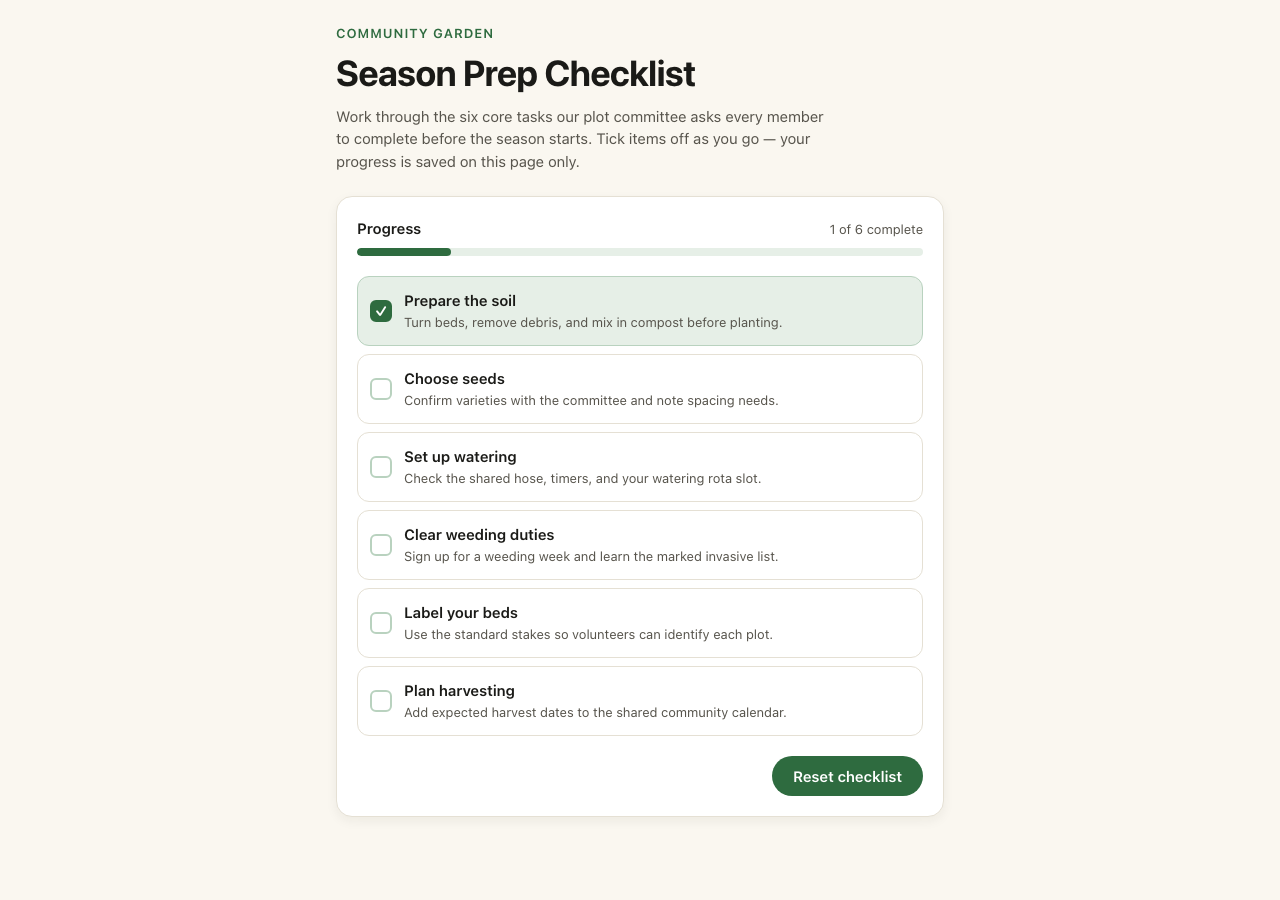
The example uses local component state, so progress clears on reload. It has no account, database or external service. Use it to inspect one working interaction and an export; evaluate backend and native-release requirements separately for your own project.
What the allowance means: Pro's standard global price is $20/month with 15 builder credits. Under the current action schedule, a new project uses 10 credits, a scoped edit 3, a larger change 5 and an automatic fix 2 when offered. A new project plus one larger change uses all 15 credits. That is an example budget, not a promise of a finished app. Review each action quote and compare plans with builder credits before subscribing. Regional prices, currency and any eligible offer are shown at checkout.
2. Zite — for business apps, data and automations
What it does: Zite combines AI app creation with a database and workflow tools. Its official feature list includes selective edits, version history, code editing, scheduled workflows and webhooks.
Who it is for: Teams building a lightweight business app around records and repeatable processes.
Pros: Bringing the interface and operational workflow together can simplify a project with several connected steps.
Limitations: Estimate records, workflow runs and credits against the plan. A dashboard demo alone does not establish how your real process behaves.
Pricing: Free access is available; Pro is $20/month billed annually on the official Zite pricing page.
Example to evaluate: A request form that creates a record, assigns an owner and sends a scheduled follow-up.
3. Emergent — for conversational app projects
What it does: Emergent offers prompt-led web and mobile app building. The Standard plan includes private project hosting and GitHub integration.
Who it is for: Builders who want to describe a project and keep iterating in a development conversation.
Pros: GitHub integration is useful when a generated project will also be reviewed or maintained outside the builder.
Limitations: Track the credits used by fixes as well as the initial build. Check the export, deployment and backend requirements for your specific project.
Pricing: A free tier is listed; Standard is $20/month billed annually. See Emergent's plan details.
Example to evaluate: A simple customer dashboard with a list, detail view and one editable field.
4. Bubble — for visually configured application logic
What it does: Bubble provides visual app building, APIs and application workflows. Its pricing page now includes a combined Web & Mobile offering.
Who it is for: Builders who want to configure app behavior through a visual platform rather than primarily editing generated source files.
Pros: A visual logic approach can make a complex sequence of actions easier to inspect.
Limitations: Workload consumption and project-level plans deserve attention as the app grows. Compare the exact web or mobile bundle you need.
Pricing: The combined Web & Mobile Starter reference is $59/month billed annually. See Bubble's current pricing.
Example to evaluate: A booking request with a status change, permissions and a recurring workflow.
5. FlutterFlow — for visual mobile development
What it does: FlutterFlow uses a visual development environment for Flutter apps, with integrations and AI assistance. Basic includes code and APK downloads and deployment tools.
Who it is for: A mobile-first team that wants detailed visual controls and a Flutter codebase.
Pros: Code download gives you a concrete artifact to inspect beyond the builder preview.
Limitations: Backend setup, app state and store configuration still need deliberate work. GitHub features and other capabilities depend on the plan.
Pricing: Basic is listed at $39/month. Check billing options and features on the FlutterFlow pricing page.
Example to evaluate: A three-screen habit tracker with saved completion state and readable layouts on two phone sizes.
6. Figma Make — for design-led prototypes
What it does: Figma Make combines prompts with design context to create code-backed prototypes. It can work from design frames and other supplied context.
Who it is for: Designers validating an interaction or turning a design into something stakeholders can explore.
Pros: Existing design context gives a prototype a more specific starting point than a vague text prompt.
Limitations: Validate the current production handoff options. The official product page marks some local-codebase and production features as coming soon; do not treat a prototype as a deployed product.
Pricing: Check eligible seats and AI allowances in Figma's pricing. See the official Make overview for current capabilities.
Example to evaluate: A working version of a checkout interaction, using fictional products and no live payment.
7. Base44 — for AI-built apps with managed services
What it does: Base44 combines AI app generation with app services such as authentication and data storage. Its current pricing page also advertises code access and two-way GitHub integration.
Who it is for: Builders seeking a prompt-led app with managed services included in the platform.
Pros: Data services and code access can support both a quick start and later review.
Limitations: Message credits and integration credits are separate limits. Third-party services can incur additional charges.
Pricing: Starter is $16/month billed annually; check the capabilities of each tier on Base44's pricing page.
Example to evaluate: A shared collection where two test accounts should see different records.
8. Softr — for portals and internal operations
What it does: Softr combines app interfaces, databases, workflows and integrations. Its AI Co-Builder and visual controls target business operations such as portals and internal tools.
Who it is for: Teams with a clear data source and a need to control what clients or colleagues can access.
Pros: Visual editing and permission controls suit an operational app that changes regularly.
Limitations: Check user limits, data-source availability and the plan required for your permission model.
Pricing: Softr's official overview lists Basic at $19/month billed annually. Confirm the current limits on Softr's site and pricing page.
Example to evaluate: A client portal where each client can only access their own project.
9. Appy Pie — for native business app projects
What it does: Appy Pie markets prompt-to-app creation for iOS and Android, with business modules such as bookings, payments and notifications.
Who it is for: A business considering a native app built around familiar customer interactions.
Pros: Prebuilt modules provide a useful shortlist of functions to evaluate.
Limitations: Confirm which modules, platforms, publishing assistance and ongoing services are included in your selected plan. A module name is not a verified integration with your account.
Pricing: Review the current offer from the official Appy Pie site; avoid relying on an old comparison article's price.
Example to evaluate: A fictional salon booking flow, including a reschedule and a cancelled appointment.
10. ToolJet — for internal tools and connected systems
What it does: ToolJet supports internal app interfaces, databases, integrations and workflows, with cloud and self-hosting options.
Who it is for: Teams building tools around existing company systems and willing to manage technical configuration.
Pros: Self-hosting options and data connections make it worth considering for an internal operations project.
Limitations: Hosting, access rules and maintenance become part of the evaluation. Price the builders and end users you actually need.
Pricing: A free evaluation tier and paid builder plans are listed on ToolJet's pricing page.
Example to evaluate: An internal inventory interface that reads from a test database and records one controlled update.
11. Glide — for operational apps from business data
What it does: Glide's current pricing page describes GlideOS, an AI app platform that starts from a spreadsheet, prompt or file. GlideOS and Glide Classic are separate products with separate subscriptions.
Who it is for: Teams evaluating an app around existing operational data.
Pros: Starting from a familiar dataset helps make requirements concrete.
Limitations: Choose the product first. GlideOS Basic supports personal and team apps; the Plus plan lists public app publishing. Do not use Classic's older plan names to budget a GlideOS project.
Pricing: GlideOS Basic is $25/month and Plus is $50/month on the current pricing page.
Example to evaluate: A stock list with a searchable table and a controlled status update.
How we compared these AI app builders
We reviewed official product and pricing pages for the build approach, output, data connections, visual controls, source access and stated limits. The order reflects our editorial use cases, with our own product first. We have not published comparative speed measurements, security certification results or a tested quality score for these tools.
Use a short evaluation brief rather than a feature count. A useful trial should establish whether the tool can perform your core action, preserve the result after reload and let you make a targeted change without breaking another screen.
| Check | Exercise | Evidence to keep |
|---|---|---|
| First working action | Add and edit one task | Actual saved record, not just a success message |
| Persistence | Reload and return to the same task | The saved change is still present |
| Permissions | Compare two authorized test accounts | Each account sees only the allowed data |
| Revision | Change one field and its validation | The original workflow still works |
| Handoff | Inspect an export or deployment path | A usable file or working URL with known dependencies |
| Cost | Record initial build and revision usage | Actual credits, hosting and API charges |
Use fictional information while evaluating. Do not connect a real payment account or confidential customer database just to try a builder.
Which no-code AI app builder should you choose?
Choose Brainbaby when you want a prompt-led prototype alongside the chat, writing and creative work around it. Choose Softr or Zite when a portal or operational workflow is the center of the project. Consider Bubble or Momen when visual app logic is your priority. Look at FlutterFlow for a visual Flutter workflow, or Figma Make for design-led interaction exploration.
For a separate comparison of classic visual tools, read our best no-code app builders guide. If you are choosing the platform for a native app, write down the device features and release requirements before choosing a builder.
Start with an app brief you can verify
Copy this brief into the Brainbaby web app builder and adapt it before generating:
Build a task manager for a small team. Include a task list, an add-task form and a task detail screen. Each task has a title, status and due date. Reject an empty title. Keep the layout usable on a phone and a desktop. Explain which parts use sample data and which parts need a backend. After each change, list the checks I should run. Do not add a live payment flow.
For an iOS or Android prototype, use the mobile builder and specify the platform and device behavior. Account access and builder credits apply. Preparing a brief does not create an app or reserve credits; review the available allowance before you submit a generation.
Frequently Asked Questions
What is a no-code AI app builder?
A no-code AI app builder uses a written instruction to generate or assemble an app without requiring you to write the initial code manually. Some products create source code; others configure a visual platform. Both approaches still need testing and maintenance.
Which builder is best for a beginner?
Start with the tool that matches your first task. Brainbaby is our editorial pick for a prompt-led prototype in an AI workspace. A data portal may be easier to evaluate in Softr, while a designer may prefer visual controls. Complete one small workflow before expanding the project.
Can AI build an app ready for the App Store?
AI can help create a project, but store readiness requires more than generated screens. Check signing, developer accounts, privacy information, permissions, purchases, real-device behavior and the store's submission rules.
Is a free AI app builder free to run forever?
Not necessarily. Free access may cover a preview or limited credits. Hosting, users, databases, API usage, publishing and revisions can have separate limits or costs. Check the current plan and the services your app depends on.
Try a result before you build your own.
Open a working Brainbaby checklist, try its controls and download the original source. No account is needed for the example. When you are ready, prepare an editable brief for your own project.
Get runnable source & guide. The GitHub example keeps the app code and updates its build tooling. Use that folder to run it locally; the original export ZIP is retained for comparison.
Know the builder budget before you subscribe.
Pro has 15 builder credits per month at the standard global price of $20/month.
- New project
- 10 credits
- Scoped edit
- 3 credits
- Larger change
- 5 credits
- Automatic fix, when offered
- 2 credits
For example, a new project (10 credits) and one larger change (5 credits) use 15 credits. This is an example budget, not a guarantee that an app will be finished within that allowance.
Credits are used for generation and revisions; they are not a count of finished apps. Review the action quote before running it. Regional prices, currency and any eligible offer are shown on the pricing and checkout pages.
Compare plans with builder creditsTrying this example, downloading its source and preparing a brief are free. Preparing a brief does not start a generation. Your own builds require account access and builder credits.
Prefer iOS or Android? Open the mobile app workflow.