Brainbaby is useful when visual concepts, copy and a wider campaign need to stay aligned. Discuss the offer, prepare the image, plan an edit and continue into the presentation or website that will use it.
By Brainbaby · Editorial review · Product comparison, not a head-to-head benchmark.
The Brainbaby advantage
From the first question to the next useful result.
01
Start with the purpose of the picture
Use chat to define the audience, subject, composition and constraints. Then open the image studio for generation or an editing workflow. The useful difference is having the creative decision and production tools in the same workspace as the copy, deck or website that will use the image.
02
Treat editing as a deliberate next step
Describe what should change and what must remain the same before submitting an edit. Inspect product details, identities, text and proportions in the returned asset. The studio workflow helps you plan revisions; it does not make every render accurate or every transformation appropriate.
03
Turn the visual into a complete launch asset
Once an image is approved, draft the headline, product description, presentation outline or landing-page brief in Brainbaby. Reuse the approved brand direction and check the final context. This is the advantage for a creator responsible for the whole campaign rather than a single image.
Product fit, side by side
Brainbaby and Ideogram: what you are choosing.
Ideogram offers AI image creation through its product and model tools.
Brainbaby’s case is the connected set of tools around your task. This table distinguishes that workflow from vendor features that need their own evaluation.
Workflow, evidence and usage comparison
Your decision
Brainbaby
Ideogram
Core product fit
A useful visual asset with the campaign work around it
Ideogram offers AI image creation through its product and model tools.
How Brainbaby expands the job
Brainbaby is useful when visual concepts, copy and a wider campaign need to stay aligned. Discuss the offer, prepare the image, plan an edit and continue into the presentation or website that will use it.
Evaluate Ideogram for the image style and rendering behavior your brief needs. If readable lettering is important, inspect the actual generated result rather than relying on a model label.
What you can inspect now
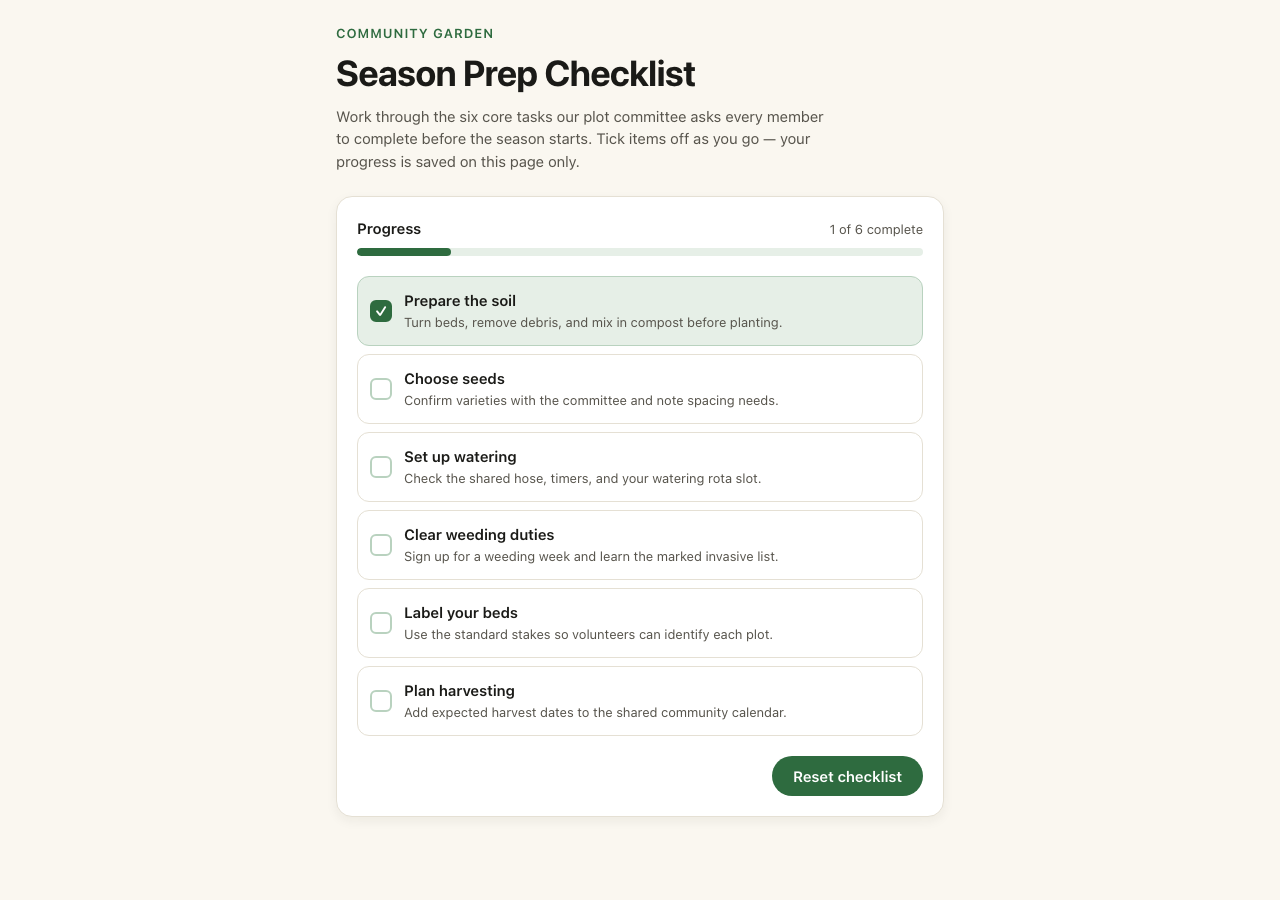
A generated four-slide presentation with PDF and PPTX, plus a small interactive checklist app and downloadable source.
Use the official source below to inspect the current product and run the same brief yourself. No competitor output is represented as tested on this page.
Agent and project context
Supported connections, selected repository access and user-managed saved memory where enabled. Important context and permissions must be supplied for the task.
Check the specific product, plan and connection permissions. This page does not infer that the competitor lacks agents, integrations or memory.
Price and usage decision
Limited free chat; paid image and video usage. Review current plan and builder allowances and the cost displayed for your job.
Verify the current plan and any model, export or usage costs with the vendor. No universal lower-price claim is made.
A practical way to decide
Give both tools a job you actually need done.
Use this starting brief, then replace it with your own source facts. It is an illustrative task, not a recorded customer result or a claim that every step runs automatically.
Develop a poster concept for a fictional local workshop. Keep event text as editable copy outside the generated image, define the visual composition and draft a matching event page and three-slide sponsor pitch.
01 · Define the result
Attach only material you have permission to use. State the audience, verified facts, constraints and final formats. Ask for an outline and missing details before generating paid assets.
02 · Work through the outputs
Approve the brief, then open the tools needed for each deliverable. Carry the approved context into the next step. For connected work, grant the required permissions and inspect what was actually returned.
03 · Compare the finished work
Review facts, edits, code behavior and exported files. Record elapsed time, revision effort and total usage cost. A useful result is the standard; a longer answer or a feature count alone is not.
What to check on this task
Does the output preserve the subject and requested unchanged details?
How many paid attempts were needed to get a usable asset?
Are the accompanying copy and image consistent with the real product?
Real files. A working interaction. No signup to inspect.
These are public Brainbaby examples with a deliberately small scope. They show the kind of work you can inspect, not a simulated conversation or a claim that your project will match them.
Presentation
A four-slide community garden deck
Generated October 2 and exported October 17, 2026, after one body-text edit. Inspect the PDF and PPTX separately: export layout can differ. This is sample content, not customer performance evidence.
Open the frontend demo, check off tasks and reset it. State lasts until reload; the example has no account, database or external service. Inspect the original source to see what was generated.
Brainbaby has limited free chat access. Review current plan windows, model availability and the builder allowance shown in your account. A connection or subscription does not mean unlimited execution.
Free image generation and free image editing are disabled. Signup does not include a free image attempt. Use the appropriate credit pack or eligible plan allowance, and check the displayed cost before a paid generation or edit.
Manage saved memory where enabled and review the permissions of connected accounts. AI processing can involve selected providers. Read the privacy policy and reconfirm important facts; this page does not promise end-to-end encryption or perfect recall.
Evaluate Ideogram for the image style and rendering behavior your brief needs. If readable lettering is important, inspect the actual generated result rather than relying on a model label.
The strongest reason to choose Brainbaby is the work you can finish across chat, creative tools, documents, presentations and building workflows. Start with one useful task and judge the result you can inspect.
Questions before you switch
Brainbaby vs Ideogram: frequently asked questions.
Why choose Brainbaby over Ideogram?
Brainbaby is useful when visual concepts, copy and a wider campaign need to stay aligned. Discuss the offer, prepare the image, plan an edit and continue into the presentation or website that will use it.
What is Ideogram best suited to in this comparison?
Evaluate Ideogram for the image style and rendering behavior your brief needs. If readable lettering is important, inspect the actual generated result rather than relying on a model label.
How does Brainbaby help an AI agent do useful work?
Brainbaby combines conversational help, supported account connections, repository work and dedicated creation tools. Start with a specific task, authorize the required access and review the returned result. Tool and provider availability matter: a proposed action is not proof that an email was sent, code was tested or an appointment was changed.
What can I try free, and what needs credits?
Brainbaby has limited free chat access. Free image generation and free image editing are currently disabled; a new account does not receive a free image attempt. Image and video work requires the appropriate credits or eligible plan allowance. Check current chat limits, builder usage and the displayed job cost before starting paid work.
Can I bring my existing repository and project context?
For repository work, connect GitHub and select a repository the connection is authorized to access. Provide the branch, task, source facts and acceptance checks. Memory, where enabled, can support recurring context and can be managed in settings; it does not automatically import a competitor’s conversations or guarantee perfect recall.
Is this an independent benchmark of Brainbaby and Ideogram?
No. Brainbaby publishes this comparison to explain its product fit. The editorial review is dated October 21, 2026. Vendor descriptions link to primary sources, and the sample task is illustrative. Public Brainbaby files demonstrate their stated scope; they are not head-to-head benchmark results, a speed test or proof of better output on every task.
Sources and how this comparison was prepared.
This is a first-party comparison published by Brainbaby. Vendor descriptions use the official pages below. Features, availability and plans can change; consult the vendor before purchase. Sample briefs are illustrative, and the two public examples are Brainbaby outputs with the scope stated above. No comparative speed, quality or cost measurement is claimed.