Brainbaby App Builder Showcase: Pepebets.com
Explore the Pepebets free browser football interface, its lobby and court design, and a practical app builder brief you can adapt in Brainbaby.
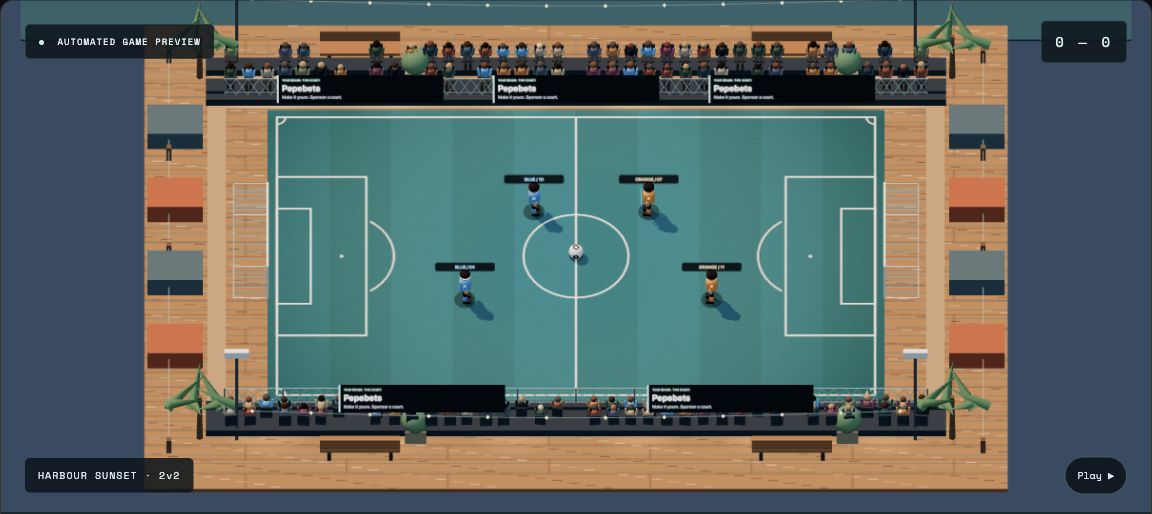
Pepebets.com is the featured project in this Brainbaby App Builder showcase: a free browser football game built around short matches and friendly rivalry. Its public site introduces 1v1 and 2v2 play, private lobbies, ranked play and a choice of courts, all through a browser interface.
For anyone planning a game or interactive web app, it is a useful product to study. The first screen explains what the experience is, gives visitors a clear way to start and shows the game before asking them to explore more. This article looks at that public interface and turns its design choices into a practical brief you can adapt in Brainbaby.
The featured image is a capture of Pepebets’ labeled automated game preview, taken on October 9, 2026.
A clear first screen for a browser game
The Pepebets homepage presents football matches as a short activity: choose a mode, bring a rival and get onto the court. The current site labels the experience a free-play beta and places its free-play action prominently beside an explanation of the game.
A visitor can also see an automated football preview. That preview is labeled, so it communicates the appearance of the game without being presented as a recording of a real customer match. The interface offers different court settings, including Street League, Harbour Sunset, Rooftop Afterhours and Moonlight Grove.
That is a useful pattern for an app builder brief: show the main experience, explain the next step and give the visual demonstration a truthful label. A working product needs more than an attractive hero section, but an understandable first screen helps people decide whether to try it.
What the public interface includes
The current Pepebets interface brings several product ideas together:
- Short match formats: 1v1 and 2v2 options give visitors a concrete picture of how a game is played.
- Two game choices: Arena Football and Orb Rush have separate descriptions and entry actions.
- Private lobbies: a create-lobby action and a join-by-code field make the friend invitation flow visible.
- Court selection: named environments make the visual setting part of the experience.
- Competition and history: ranked play, a leaderboard and a match-history entry give returning players more places to go.
These are observations of the published interface. Match reliability, matchmaking speed and player numbers are separate questions that need actual gameplay evidence.
An app builder brief you can reuse
Start with a small, testable product description. For a similar free-play browser game, you could give Brainbaby a brief like this:
Create a responsive landing page and interface for a free browser football game. Explain 1v1 and 2v2 matches near the top. Include a clearly labeled game preview, court selection, a create-lobby action and a join-by-code field. Make the primary action easy to find on a phone. Show honest loading, empty and error states. Separate preview behavior from real multiplayer behavior, and never display invented players, matches or scores as live activity.
Then work through one journey at a time. First check the landing page and mode selection. Next check creating a lobby and joining it from another session. After that, connect the interface to the actual game and check the full match lifecycle.
When using an AI app builder, describe the expected behavior as well as the appearance. “A player enters an invalid room code and sees a useful error without losing the code” is a more useful requirement than “make the lobby look premium.”
What to check before calling it ready
A browser game brings together a website, input controls and a live session. Review each part on its own and then test the complete journey:
- Open the page on a narrow phone screen and check that controls remain readable and reachable.
- Try the room-code field with valid, invalid and expired invitations.
- Check what happens when a connection drops or a player leaves.
- Confirm that the displayed score, winner and history come from the actual match result.
- Test keyboard and touch controls separately, including the instructions shown to each player.
For more ideas about turning an initial concept into a focused project, see our guide to building your first app with AI. Keep the first version small enough that you can test the whole flow yourself.
Explore the showcase
Visit Pepebets.com to explore its current free-play browser football interface. Use the product choices above as inspiration for your own brief, then open Brainbaby App Builder to work on your next app idea.
Start your next task with Brainbaby
Prepare your brief, choose a workflow and check the allowance in your account.
Create an account