AI photo maker for realistic portraits, headshots and product shots
An AI photo maker creates photo-realistic images from a description, or reworks a photo you upload. In Brainbaby Image Studio you can make lifestyle portraits, professional-looking headshots, product shots and profile pictures: describe the subject, lens and light like a photographer, check the image-credit cost, then generate.
Realistic photos and the prompts behind them
Photo realism comes from camera language: lens, light, texture and an ordinary moment. These are Brainbaby’s own images with the prompts published beside them.
The portraits and the cabin are published examples with the prompts shown next to them, not records of the exact generation; the people are fictional. The cup is a recorded Image Studio result from 5 October 2026 with the exact prompt used. Your results will differ.
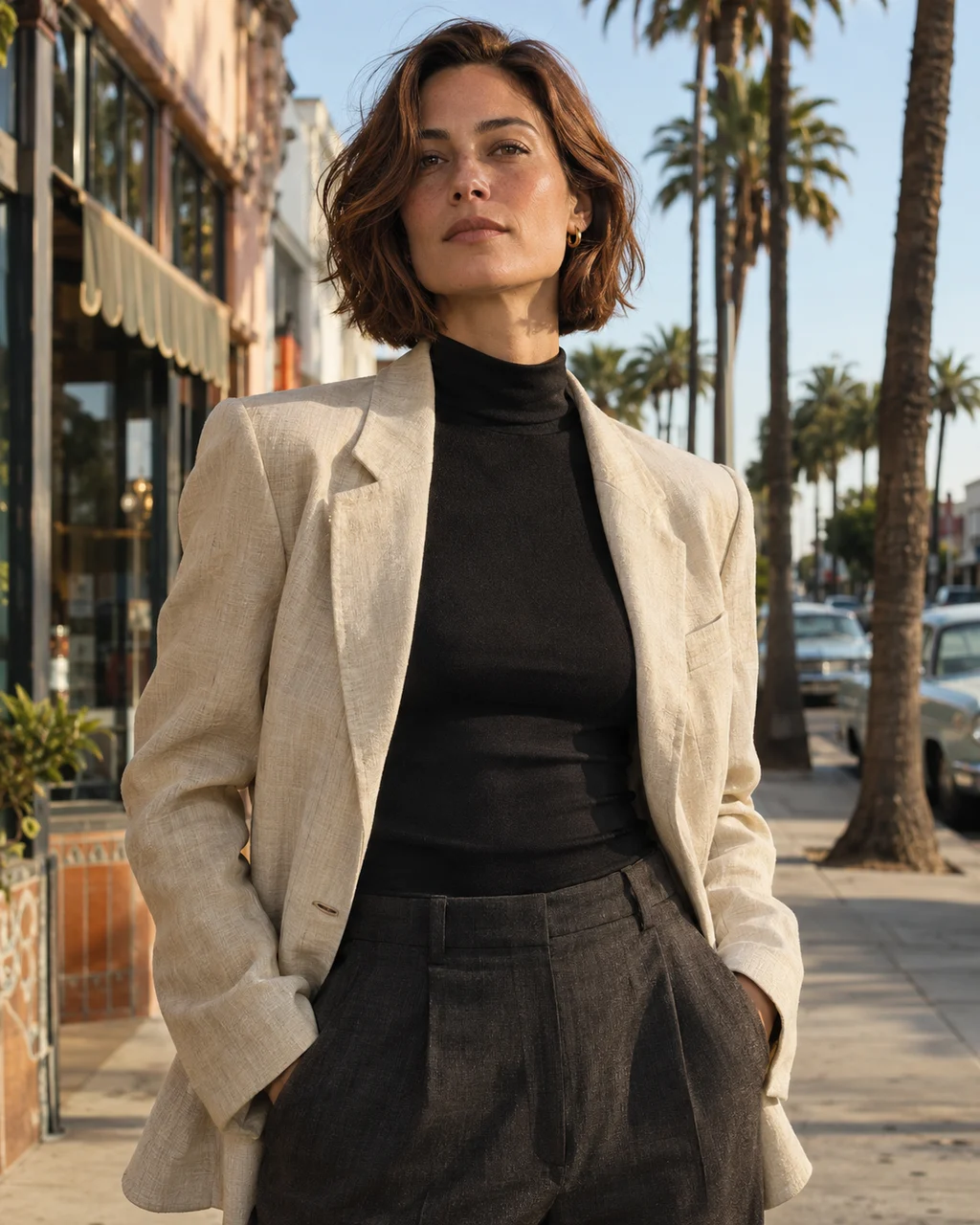
Editorial portrait in daylight
An editorial photograph of a fictional woman in her thirties in an ivory linen blazer, high-neck black top and tailored charcoal trousers on a palm-lined California street. Waist-up composition, natural skin texture, tactile linen, late-afternoon light and a subtle 50mm film look. No text or logos.
Cinematic portrait at blue hour
A cinematic editorial photograph of a fictional man in a dark leather jacket over a white crew-neck shirt on a rain-lit city street at blue hour. Natural proportions, realistic skin and fabric, soft storefront reflections and an understated 50mm film look. No text or logos.
Product shot (recorded result)
A blue ceramic cup on pale stone, soft window light, no text or logos.
Atmospheric location photo
A cozy cabin in the mountains during a snowstorm, warm light inside
Prompts for the four most common photo jobs
Professional headshot from your own photo (editing mode)
Keep my face, hairstyle and expression exactly as they are. Replace the background with a plain light-gray studio backdrop, add soft even key light from the front left, and change my top to a navy blazer over a white shirt. Head-and-shoulders crop, centered. No text.
Lifestyle portrait of a fictional person (from text)
A candid photograph of a fictional man in his thirties laughing at a café table by a window, holding a coffee cup. 35mm lens, shallow depth of field, soft morning light, natural skin texture, muted colors. No text or logos.
Product shot
A matte black water bottle standing on a light oak surface against a warm beige wall. Soft window light from the right, gentle shadow, eye-level angle, 85mm lens, square format, lots of empty space around the product. No text or logos.
Profile picture
Keep my face and hair unchanged. Make a square, centered head-and-shoulders crop with a softly blurred green park background and warm late-afternoon light. Leave margin around the head for a circular crop.
Make it look like a photo, not an illustration
Speak like a photographer
Lens (35mm, 50mm, 85mm), aperture effect (“shallow depth of field”), light source (“window light”, “overcast”, “golden hour”) and film look are the words that steer a model toward photography.
Ask for ordinary texture
“Natural skin texture”, “visible fabric weave”, “slight film grain” and “realistic proportions” read as real. Words like “flawless”, “hyper-detailed” or “masterpiece” tend to produce a glossy, artificial finish.
Keep the moment simple
One person, one action and one light source look more believable than a crowded scene. Hands work best when they hold something or rest naturally.
Inspect before you post
Zoom in on eyes, teeth, ears, fingers, jewelry, reflections and any lettering. These are the details that give an AI photo away.
Real people in AI photos
Your own likeness
Editing your own photo into a headshot or a profile picture is a common use. The result can drift from your real face; check it before using it where people expect an accurate likeness, such as an ID or a professional profile.
Other people
Use another person’s photo only with their permission. Do not create images that put real people in situations they did not agree to, and do not present a generated photo as a real event.
What the AI photo maker handles
Photographic prompts
Name the lens, depth of field, light and film look; Image Studio models respond to the same terms a photographer would use.
Portraits of fictional people
Describe a person’s age range, clothing, expression and setting for mockups, stories and campaign concepts without a photo shoot.
Headshots from your own photo
Upload a photo of yourself in editing mode and ask for a cleaner background, studio light or a different top.
Product shots without a studio
Describe the surface, backdrop and light, or upload your product photo and change only the setting around it.
Square profile pictures
Choose a square format, keep the face centered and leave margin for the circular crop most apps apply.
Cost before every photo
The image-credit cost and your balance are shown before you generate or edit, for new photos and reworked ones alike.
Photos people make with AI
Headshots for CVs and profiles
Rework a photo of yourself with a clean background and even light when a studio session is not practical.
Store and catalog shots
Give product photos consistent backgrounds and light across a collection, then verify every product detail.
Profile pictures
Make a square, centered portrait that still reads clearly at thumbnail size.
Ads and mockups with fictional models
Visualize a campaign or a landing page with realistic fictional people before booking a shoot.
How to make a realistic AI photo
Choose text or your own photo
Start from a description to create a new photo, or open editing mode and upload a photo you own to rework it.
Describe the shot like a photographer
Subject, action, setting, lens, light and crop. For an edit, also say what must stay unchanged, such as your face or the product label.
Pick the format and check the cost
Square for profiles, portrait for phones, landscape for banners. Review the image-credit cost before you submit.
Generate, zoom in, refine
Check eyes, hands and edges at full size. Adjust one detail per round instead of rewriting the whole prompt.
Frequently Asked Questions
What is an AI photo maker?
An AI photo maker is an image generator steered toward photographs: portraits, headshots, product shots and scenes that look like they came from a camera. You describe the shot, or upload a photo to rework, and the model generates a realistic image.
Can it turn my selfie into a professional headshot?
You can upload your own photo in editing mode and ask for a studio background, better light and different clothing while keeping your face. The likeness is not guaranteed to be exact, so compare the result with your photo before using it professionally.
Are the people in generated photos real?
People generated from a text prompt are fictional. Do not prompt for a real, identifiable person without their consent, and do not present a generated photo as a record of a real event.
Can I make product photos for my online store?
Yes, for concepts and backgrounds. For a real product, upload your own photo and change only the setting, then check the shape, color and label against the item. A generated image must not misrepresent what a customer will receive.
Is the AI photo maker free?
Sign up and your first image is free: once your email is confirmed, generate one image or edit one of your own photos. After that, photos use image credits from a one-time pack or a monthly plan. The cost is shown in Image Studio before each job.
What format should I use for a profile picture?
Use a square format with the face centered and some space around the head, because most apps crop profile pictures into a circle. Check the result at small size too.
Can I use AI photos commercially?
Check the service terms and the selected model’s terms for your use. Rights in any source photo, likeness or brand still apply, and some platforms require AI-generated images to be labeled.