Parts of a Resume: Sections, Order and Examples
A resume usually contains contact information, relevant experience, education and skills. A short summary, projects, volunteering or certifications can help when they supply evidence for the role. The order depends on what you can show: a recent graduate may lead with education and projects, while an experienced applicant may put relevant work first. This guide covers a general US job-application resume, rather than an academic CV or every country’s application conventions.
Start a resume in Word without paid experience
Download an original one-page starter. Replace its placeholders with your own education, class projects, volunteering and skills. Remove any section that does not apply.
Editable .docx · English · US Letter · No account needed
Download the Word resume starter
The file contains placeholders, not an applicant’s experience. You can edit it without Brainbaby. AI rewriting is a separate chat request and uses your account allowance.
Step by step
Start with contact information
Make your name and the contact details you choose to share easy to find. Check the email address and any relevant portfolio link. Keep this information in the main document rather than relying on a decorative header. Do not add identity numbers or other private records merely to fill the page. Follow the actual application’s instructions.
Choose the strongest evidence for the role
Read the job requirements and list your own matching experience. Keep requested skills separate from skills you actually have. Select work, study, volunteering or personal projects that demonstrate that connection. An employer’s requirement is not evidence that you meet it. If a required fact is missing, leave it as a question for yourself rather than inventing it.
Put experience and education in a useful order
Place your strongest relevant section near the top. CareerOneStop suggests education before work experience for a new graduate or recent relevant training, and after work experience when that experience is stronger. Within education, list the most recent first. Keep an in-progress qualification distinct from one you have earned, and label an expected completion date accurately.
Describe the work, not a list of adjectives
Under each relevant role or project, explain what you did and what you used. Include a result or quantity only when you can support it. A class project belongs under Projects or relevant education; it does not become paid employment because the wording sounds professional. Preserve your own contribution within a team, dates and any limitations on what was measured.
Add skills and optional sections selectively
Name tools, languages or techniques you can discuss and use. Add a short summary only when it connects real experience to the intended role. A relevant project, volunteering activity or certification can deserve its own section; unrelated material does not need one. Remove empty template sections. A long list of skills copied from the job description does not establish experience.
Check the actual file before applying
Use familiar headings such as Work Experience, Education and Skills, with consistent spacing and a readable single-column layout. CareerOneStop recommends these conventions to make information easier to find; they do not guarantee an applicant-tracking-system result. Use the file type requested by the employer. Open the saved version and check its wording, links, section order and any text that moved or disappeared.
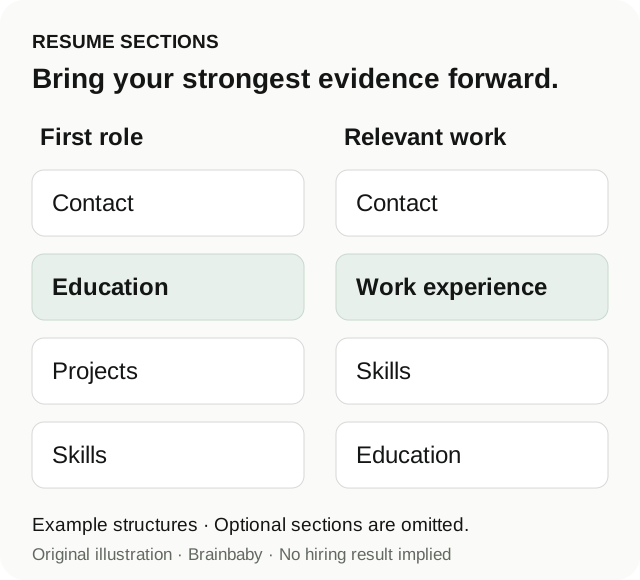
Resume section order: two fictional examples
These outlines were authored for this guide. They are illustrative structures, not generated applicant resumes, employer preferences or hiring results. Replace every bracketed item with your own facts.
First role with relevant study and a class project
CONTACT
[Name and chosen contact details]

EDUCATION
[Program, institution and truthful completion status]

PROJECTS
[Class inventory project: your work, tools and what was checked]

VOLUNTEERING
[Include only an activity you actually completed]

SKILLS
[Tools and methods supported by your experience]
Experienced applicant with relevant work history
CONTACT
[Name and chosen contact details]

SUMMARY — optional
[Two factual lines connecting your experience to the role]

WORK EXPERIENCE
[Recent relevant role, dates and evidence-based bullets]

SKILLS
[Relevant tools and methods you can use]

EDUCATION AND TRAINING
[Qualifications earned or clearly labeled as in progress]
The reason for the different order
The first outline brings the available study and project evidence forward. The second brings relevant employment forward. Neither requires a summary, a volunteering section or the same number of bullets. Choose a structure that helps a reader locate your actual evidence rather than copying an order mechanically.
Turn a note into a truthful project bullet
This original fictional example shows a wording decision. It is not an AI output or a claim about a real applicant.
Source note
In a class project, I used a spreadsheet to compare recorded stock counts with a sample list and marked mismatches for review. The project did not measure time saved, sales or a business’s inventory accuracy.
Illustrative bullet
Compared recorded stock counts with a sample list in a class spreadsheet project and flagged mismatches for review.
What must not be added
The source supports comparison and flagging mismatches. It does not support “improved accuracy by 30%,” a retail employer, a management title or a financial result. A useful bullet can explain an action without a fabricated percentage. If you later find a verified result, review it against the original record before adding it.
Map one requirement to your own evidence
A small worksheet to fill in
Requirement in the job description:
My real example:
What I personally did:
Tool or method I used:
Verified result, if any:
What is not measured or still unknown:
Resume section where this belongs:
Fact to check before applying:
Use Brainbaby after you have the facts
The brief below can organize source notes for an AI writing request. Read and edit it, then choose whether to continue into chat. Preparing instructions here does not generate a resume or submit an application. The Word starter above can be edited without a Brainbaby account; AI requests are separate and use the account’s current allowance.
Frequently asked questions
What are the main parts of a resume?
Contact information, relevant experience, education and skills are a useful starting point. A summary, projects, volunteering or certifications may be added when they help establish relevance. Keep only sections you can fill with truthful, useful information.
Should education come before experience?
It can for a new graduate or recent relevant training. Relevant employment can come first when it provides stronger evidence. The best order depends on your actual background and the intended role, not a universal template rule.
What if I have no paid work experience?
Use relevant coursework, projects, volunteering or other real experience, clearly labeled. Explain your own contribution. Do not invent an employer or present a class project as a paid job.
Do these headings guarantee that an ATS accepts my resume?
No. Familiar headings and a simple layout can make the document easier to read, but application systems and employer requirements differ. Check the actual saved file and follow the requested format; no template or AI draft guarantees screening or an interview.
Can I download the Word starter without signing up?
Yes. The original Word starter has editable placeholders and does not require an account. The file is not an applicant’s completed resume. AI rewriting in Brainbaby chat is a separate request with account limits.